




55" Cozyla Calendar Max Go
Cozyla Calendar Go Max is a mobile 55" 4K smart calendar powered by CalendarOS, built for scheduling, collaboration, and everyday family organization.It features a customizable smart dashboard, split-screen interaction, and a powerful touch canvas for planning, learning, and creating. *The Battery Pack sold separately.
Pairs well with
Features
Cozyla Calendar Max Go is a mobile 55" smart calendar powered by CalendarOS—combining shared scheduling, family organization, creative smartboarding, and entertainment into one stunning 4K touch screen.
- Dashboard: A 55" 4K smart board with fully customizable widgets, drag-and-drop layouts, and templates.
- Creative Smart Board: A spacious canvas for brainstorming, studying, and planning, with gesture zoom, 20-point touch, annotation, and saving screenshots with ease.
- Side-by-Side Collaboration: A stunning 55-inch 4K smart board — built for shared, split-screen use.
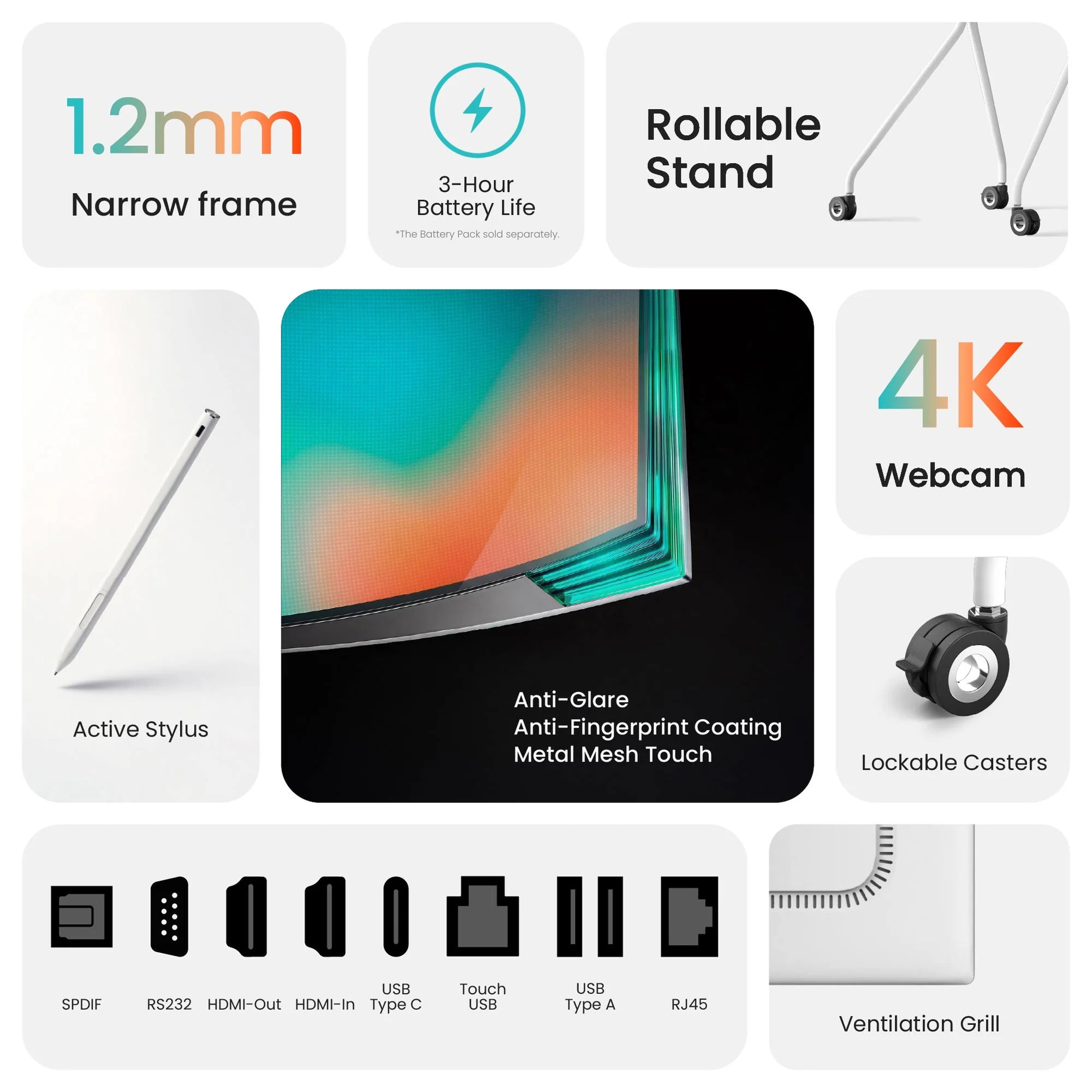
- Display & Touch Experience: A 55" 4K IPS panel with fully-laminated touch, anti-glare, and anti-fingerprint coating.
- Calls & Connectivity: A 4K detachable camera, an 8-mic array with echo cancellation and AI noise reduction, stereo speakers tuned for clear voice, and reliable network performance.
- Shared Calendar: Two-way syncing with Google, iCloud, Outlook, CalDAV calendars*, URL-based calendars, and more.
- Family Profiles: Create personalized profiles with automatic color coding, then switch between individual and merged views to see who’s doing what in seconds.
- Tasks & Rewards: Set chores and routines with schedules and reminders, track progress, and reinforce consistency with built-in rewards.
- Meal Planning: Plan meals with a recipe library, auto-generate grocery lists, and follow tutorials in full-screen with optional voice control for hands-free use.
- Companion App: Sync all your calendars, tasks, and meals for every household member with Cozyla+.
- App Store: Access Google Play to download apps of your choice for a versatile 4K experience.
- Parental Lock: Screen-time management and app locks that help create a healthier and more focused setup.
- Sleep Mode: Sleep/wake schedules and customizable screensavers to reduce nighttime glow and support energy-saving routines.
- Mobility Package: A 28,000mAh battery for unplugged use, fully rotatable, plus a minimalist rolling stand—built to move smoothly between rooms.
- Connectivity: Full-function USB-C with support for up to 15W power output, HDMI-In & HDMI-Out, two USB-A ports, and wireless casting support.
*Pre-Order Available for the U.S. ONLY
Specifications
- Dimensions:
57.68" x 7.48" x 34.25" (Main Package)
22.95" x 10.43" x 4.53" (Battery Package) - Weight: 109.13 lbs
- Performance: Octa-Core CPU, 8GB RAM, 64GB ROM
- Display: 55" 4K Fully Laminated IPS Panel, 178-Degree Wide Viewing Angle, 20-Point Touch, Metal Mesh Touch Technology
- Network: Dual Wi-Fi Module (Wi-Fi 6 + Wi-Fi 5), Bluetooth 5.3, Ethernet
- Speaker: Dual 10W Speakers
- Microphone: 8-Microphone Array with Noise & Echo Cancellation
- Battery: 28,000 mAh
- Webcam: 8MP, 4K 30fps, 93.8-Degree FOV, Detachable (USB Type C)
- I/O: SPDIF, RS232, HDMI Out, HDMI In, USB Type C, USB Touch, USB Type A, USB Type A, RJ45, DC-In
Live Demo
Explore our demo videos and live demo here.
What's in the box?
Standard In-Box Items
- Cozyla Calendar Max Go
- User Manual
- Power Adapter & Cord
- Webcam
Complimentary Pre-Order Add-Ons
- Rollable Stand
- Stylus
Add-Ons
- 3-Hour Battery Pack
*For Non-US Customers: The Cozyla Calendar Max Go comes with a Type-B US Plug (two flat pins with a round grounding pin). Plug adapter not included.
In stock! Ships within 1-2 business days.
30-day risk-free trial
1-Year Warranty
55" Cozyla Calendar Max Go


At Home, In Your Flow
Everything comes together on one screen — from schedules and notes to meetings and ideas. No setup, no distractions — just a seamless flow from the moment you begin.

In the Office, In Control
From quick check-ins to full meetings, from screen sharing to capturing ideas on the spot — Max Go keeps everything within reach.

Growing Into Their Day
With a gentle structure guiding what comes next, each moment finds its place — from learning to helping out, from focus to play.

A World, Up Close
Curiosity doesn’t just grow here — it unfolds. On Max Go, things come into view — vivid, immersive, and full of detail.

Where Ideas Take Shape
A thought, a line, a spark — and it begins. Whether it’s solving, sketching, or simply exploring, the experience feels effortless — like thinking out loud, in motion.
CalendarOS
Your all-in-one family organizer

Shared Calendar
Your calendar is always perfect. Every change syncs instantly across all your platforms (iCloud, Google, and more). Stay organized and never double-book again!

Day/Week/Month View
Flexibility to plan your way. Quickly switch between Day, Week, or Month views. Instantly toggle between your personal schedule and the full group view.

Visual Color Tags
Organize the chaos. With one unique color for every family member, your schedule instantly transforms into an easy-to-read chart. Know who is busy and where they are with zero effort.

Family Profiles
One calendar, up to 8 profiles. See everyone's schedule at once. Easily know who's busy or available for instant family planning.

Chore·Routine
Build better daily habits with recurring tasks. Make chores fun. Assign family members tasks and motivate them with points.

Reward
Gamify your day! Completing tasks earns stars and fun emojis. Let your family save them to unlock exciting, custom rewards you define together.

To-do
Easily organize one-time tasks! Keep your day flexible while maintaining clarity on what needs to be done—so nothing slips through the cracks.

Family Progress
Celebrate progress together. A Family Progress Widget displays each member's stars, visualizing how far everyone has come.

Meal Planning
Organize meals with ease and take the stress out of “what’s for today.” Save time, reduce waste, and keep your family’s nutrition balanced with thoughtful planning.

Grocery Lists
Simplify every grocery trip. Turn any recipe into a shopping list with just one tap. Check off items as you go for a smarter way to shop.

Recipe Library
Never run out of dinner ideas. Browse featured dishes, or easily save your own family favorites. Follow simple step-by-step instructions and YouTube videos for effortless cooking inspiration.

Pantry Management
Organize your kitchen. Easily track what ingredients are running low and get reminders for upcoming expiration dates. This ensures you never buy what you already have or waste food again.

Custom Widgets
Custom widgets build your perfect family command center. Place, resize, and arrange all core features freely to create a layout that fits your daily use.

Enhanced Notification
Reminders that ensure every task, event, and responsibility reaches the right person at the right time—so everyone stays informed and on track.

App Folder
Keep your essentials one tap away. Add shortcuts for the apps you use most. Group them into simple folders for fast, clutter-free access to everything your family needs.

Layout Customization
Take full control over your Calendar+ 2. Create or reorder multiple pages for various needs. On each page, intuitively add and edit widgets to build your perfect view.

Page Templates
Start fast with ready-made templates. Quickly create, edit, or delete your own templates to match your family's unique routines or goals.

Endless Choices
Get everything your family needs in our pre-installed app store. Explore the app store with limitless possibilities—from learning tools to entertainment.

Smart Home Hub
Works with both the Amazon Alexa and Google Home ecosystem, along with any other platforms that are compatible with CalendarOS.

Parental Lock
Keep screen time balanced. Easily set limits and screentime for app usage. Access outside these hours requires your permission, protecting focused family time.

Cozyla AI*
Your family voice assistant that plans everything with only a sentence, edits your requests on the fly, and creates personalized recommendations just for your family.
*: Early Access

Smart Import
Instantly capture anything in seconds. Just paste a single URL or snap a photo—recipes, calendar events and more! Go from exploring ideas to organizing your day in one tap.

Companion App
Stay connected, even on the go. Manage every aspect of your family life—calendars, tasks, and meals. Anytime, anywhere right from your phone with Cozyla+.

Notes
Your canvas for creativity and productivity. Insert photos, stickers, or sketches into your notes. Then, instantly share your ideas by exporting them as images.

Sleep Mode
Set it and lay back. Schedule exactly when the screen powers down for the night and wakes up in the morning. Rest easy knowing your screen time is controlled.

Screensaver
- Turn idle time into a slideshow of your favorite family moments, from both photos and videos.
FAQs
How is the Calendar Max Go different from the Calendar+ Go?
The Calendar Max Go is designed for larger shared spaces and a more immersive multi-user experience, while the Calendar+ Go is built for mobility and flexible room-to-room use. Both are powered by Cozyla’s family organization experience, CalendarOS, but the Max is positioned as a larger-format hub for shared, side-by-side use, while the Go emphasizes mobility.
What makes the Calendar Max Go different from a 55" TV?
The Calendar Max Go is an interactive smart board built for everyday organization, productivity, and shared use, rather than media consumption alone. Unlike a standard 55-inch TV, it is designed as a smart board for planning, coordination, and day-to-day family or work routines.
What's included when I pre-order the Calendar Max Go?
When you pre-order a Calendar Max Go, it includes the standard in-box items (the Cozyla Calendar Max Go, user manual, webcam and power adapter, and power cord), along with accessories that are only gifted to early adopters during the pre-order period for free, including a stylus, rollable stand, and battery pack. These gifts are limited-time only and may not be included after the pre-order period ends.
When is the estimated shipping time for pre-orders?
Pre-orders are expected to begin shipping in the first week of May and will be fulfilled in batches. Shipping updates will be sent primarily via email, and tracking information will be provided as soon as your package is dispatched. Most pre-order customers are expected to receive their orders by May 31st, depending on order sequence and shipping destination.
Is the Calendar Max Go a standalone system, or is a computer required?
The Calendar Max Go is a standalone system and does not require any separate device for everyday use. It is designed to function as an all-in-one smart board for planning, organization, and app-based workflows.
Can I print directly from the Calendar+ Max?
The Calendar+ Max is a standalone system and does not require a separate computer for everyday use. It is designed to function as an all-in-one smart display for planning, organization, and app-based workflows.